Coverage of the Olympic Games is dominated by the International Olympic Committee's (IOC) contracted rights-holder and accredited major media conglomerates. However some feel there is a role for crowdsourced documentation of both sporting events and the cultural context in which it happens.
This expert panel discusses changes, challenges, and opportunities facing grassroots media makers around the Vancouver 2010 Winter Games.
From Northern Voice 2009.
2009-07-07

2009-06-18
Pecha Kucha Vancouver: Erin Boniferro
Along with her tools for the revolution (yellow putty balls), Erin Boniferro displays her textile-inspired art works and discusses the importance of early childhood education. From Pecha Kucha Vancouver.
Pecha Kucha Vancouver: Chris Bentzen
“Hot one inch action.” From button trading expositions to bike inspired tattoos, Chris Bentzen humorously presents the idea of community to bring together people and passions in the art world. From Pecha Kucha Vancouver.
Pecha Kucha Vancouver: Dinka Pignon
Would you attend a dinner with virtual guests? Or be taken to a hospital where the disease and cure are both art? Dinka Pignon presents VIVO, a not for profit organization, as having evolved beyond just video production. From Pecha Kucha Vancouver.
2009-06-09
DSLR Dual-System Audio: The 99.9% Solution
[Update 2010-02-08: There is an update to this topic with an alternative approach here.]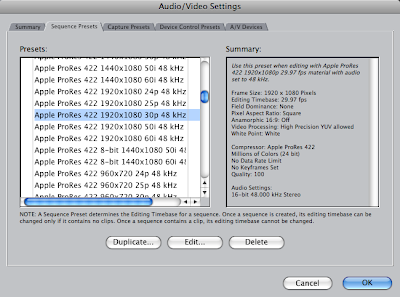
What is dual-system audio?
Dual-system audio is one name for the technique of recording audio and video on separate devices, and then combining them in post-production. Since the quality of built-in mics and audio systems of cameras are generally not nearly as good as the video, dual-system is a convenient way to get high-quality sound. It is particularly effective for video coming from a DSLR like the wildly popular Canon 5D Mark II.
The price to pay for these benefits is a small one: you need to synchronize the audio and video in post-production. This can be done manually or automatically using our PluralEyes product.
The problem with Final Cut Pro
Many non-traditional cameras shoot video at 30 fps instead of the more usual (in some parts of the world) NTSC rate of 29.97 frames per second (fps). If you are using Final Cut Pro with such video there is one quirk that you need to be aware of. This has been discussed in recent blog postings (see, for example the comment at 9:45 of the Zacuto video here). The quirk has come to be known as the 99.9% problem: when audio is combined with 30 fps video, the audio speed (sometimes) needs to be adjusted by the NTSC factor of 99.9% (actually 1000/1001).
Fortunately there is a simple fix for this: use an Easy Setup for 30 fps. Details below, but first some background.
Background
Video from a DSLR and other still cameras is typically recorded with a frame rate of 30 fps. If you do a lot of work with NTSC video, your default settings in Final Cut might be something like HDV 1080p30 which has a framerate of 29.97 fps. When you work with 30 fps material, you might expect that ensuring that the sequence frame rate is 30 (and not 29.97) would be enough to make things work. But what happens is that when you add an audio track to the timeline, Final Cut retains some memory of the NTSC settings and applies an NTSC adjustment to the playback speed of the audio. This seems like a bug to me--I can't imagine any situation where I would want it to do this. Fortunately you can prevent this from happening by using the right kind of Easy Setup.
The pre-packaged, easy way
If you are editing video from a Canon 5D Mark II using the ProRes 422 codec, you can download the Easy Setup here and copy it to /Library/Application Support/Final Cut Pro System Support/Custom Settings. Choose this Easy Setup, restart Final Cut and all should be good. Note that if you had already created a sequence before performing those steps, you need to throw it out and re-create it from scratch.
If you are using a different kind of video that is using a non-NTSC framerate, the following takes you through the steps to create the Easy Setup. You'll need to make changes that are appropriate for your video format, but they should be obvious.
The do it yourself way
- Create a suitable Easy Setup
- Select that Easy Setup
- Re-start Final Cut Pro
- Create a new project and work with that.
Here are the details on how to create an Easy Setup for video from a Canon 5D Mark II that has been transcoded to ProRes 422 (which seems to be the consensus recommendation for how to edit 5DMKII video, at least, if you've got FCP 6). We're creating a new Easy Setup because none of the ones that ships with Final Cut is suitable. The following video tutorial shows both the problem and how to fix it. [Note: In the tutorial I suggest changing the audio sample rate to 44.1 kHz. It makes more sense to use the sample rate of your externally recorded audio, which is probably 48 kHz.]
Go to the menu item Final Cut Pro > Audio/Video Settings... > Sequence Presets. Pick Apple ProRes 422 30p 48kHz, because it's close to what we want to end up with, and choose Duplicate...

Type in something appropriate for the name and description as shown and make two changes. The important one is to change the Editing Timebase to 30 fps. Set the Audio Settings > Rate to the rate of your externally recorded audio (probably 48 kHz).
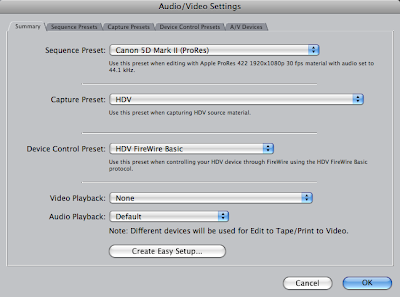
Choose OK and then go to the Summary tab and choose Create Easy Setup.

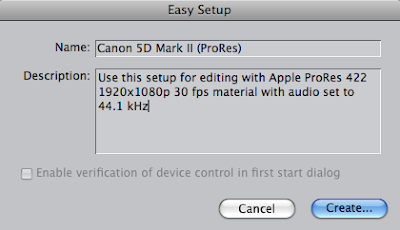
Type in an appropriate description,

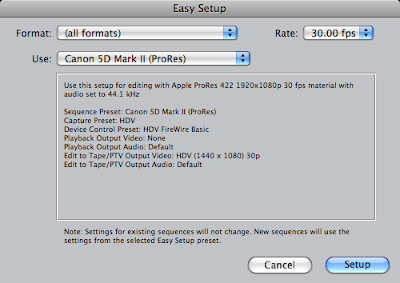
and select this Easy Setup.

Restart Final Cut Pro. For any newly created sequences, the audio and video will play at the same rate with no need for a 99.9% speed change.
Update 2010-02-05: Modified to make it clear that if you have a sequence created before you applied the right Easy Setup and re-started FCP, you also need to re-create that sequence from scratch. The speed problem occurs when the sequence is created and any frame rate mismatch will be baked in and won't change, even if you change the Easy Setup.
Update 2010-02-08: Modified to make the cleaning up step even more thorough. The speed problem actually gets baked in when you import your audio into the project. So you need to start a new project after doing the Easy Setup. I'm working on a whole new blog post about this.
2009-06-07
Deleting Custom Settings in Final Cut Pro
This is the first of a couple of technical notes about video editing.
If you edit with Final Cut Pro, you may end up creating some custom Sequence Presets and custom Easy Setups. And chances are you will want to delete some or all of the ones you've created. This is easy to do, but finding out how is surprisingly hard.
Here's how. Note that step #3 will cause all your preferences to be forgotten and it will be like starting Final Cut after a fresh install. If that sounds too awful, then don't do it and just live with the extra customizations showing up in your list.
1. Exit Final Cut Pro.
2. Delete any custom Easy Setups here:
/Library/Application Support/Final Cut Pro System Support/Custom Settings
3. Trash your Final Cut Pro preferences by deleting the following files.
~/Library/Preferences/com.apple.FinalCutPro.plist
~/Library/Preferences/Final Cut Pro User Data/Final Cut Pro 6.0 Prefs
~/Library/Preferences/Final Cut Pro User Data/Final Cut Pro Obj Cache
~/Library/Preferences/Final Cut Pro User Data/Final Cut Pro Prof Cache
4. Empty the Trash.
5. Restart Final Cut Pro.
If you edit with Final Cut Pro, you may end up creating some custom Sequence Presets and custom Easy Setups. And chances are you will want to delete some or all of the ones you've created. This is easy to do, but finding out how is surprisingly hard.
Here's how. Note that step #3 will cause all your preferences to be forgotten and it will be like starting Final Cut after a fresh install. If that sounds too awful, then don't do it and just live with the extra customizations showing up in your list.
1. Exit Final Cut Pro.
2. Delete any custom Easy Setups here:
/Library/Application Support/Final Cut Pro System Support/Custom Settings
3. Trash your Final Cut Pro preferences by deleting the following files.
~/Library/Preferences/com.apple.FinalCutPro.plist
~/Library/Preferences/Final Cut Pro User Data/Final Cut Pro 6.0 Prefs
~/Library/Preferences/Final Cut Pro User Data/Final Cut Pro Obj Cache
~/Library/Preferences/Final Cut Pro User Data/Final Cut Pro Prof Cache
4. Empty the Trash.
5. Restart Final Cut Pro.
2009-06-05
Pecha Kucha Vancouver: Marian Bantjes
Graphic artist Marian Bantjes presents a wonderful, exhilarating array of art pieces inspired by her dentist, cake and love gone right and wrong. From Pecha Kucha Vancouver.
2009-06-02
Pecha Kucha Vancouver: Jeff Hamada
Jeff Hamada gives a very funny retrospective of his artistic development from promising hockey and dinosaur drawings as a child, through a low point (ceramics) and then numerous design successes and the popular booooooom.com site. From Pecha Kucha Vancouver.
PKVN06: Jeff Hamada from Singular Software on Vimeo.
PKVN06: Jeff Hamada from Singular Software on Vimeo.
2009-05-24
Pecha Kucha Vancouver: Jesse Savath
"If you want something in life you just have to try it." Director, photographer and founder of the film collective Salazar, Jesse Savath illustrates that aphorism by the example of his own evolution. The starting point was a complete lack of ideas. From there he shaped a successful career doing what he loves in a series of steps that often involved just showing up and figuring it out when you get there. From Pecha Kucha Vancouver.
2009-05-23
Pecha Kucha Vancouver: Matthew Miyagawa and Vince Chan
Any presentation that ties together environmental biology, shirt design, cross-country sneaker tours and food blogging has got to be interesting. Matthew Miyagawa and Vince Chan, the founders of Finale Design, survey their wide-ranging creative projects at Pecha Kucha Vancouver.
Technical note: The audio quality is not great. (Sorry!) You may need to listen with headphones.
Technical note: The audio quality is not great. (Sorry!) You may need to listen with headphones.
2009-05-21
Pecha Kucha Vancouver: Rex Weyler
Many years ago, Rex Weyler had to choose between going to Vietnam, a jail in Texas or Vancouver. Vancouver won. He tells the story of how he pursued a career as journalist and photographer, and how his enduring interest in the way environments shape who we are led him to become one of the founders of Greenpeace International. From Pecha Kucha Night Vancouver.
2009-05-18
Pecha Kucha Vancouver: Alex Beim
Alex Beim has created some of the most inventive interactive amusements for public events that I've ever seen. He shows some of his projects and how they came about in this presentation at Pecha Kucha Vancouver.
2009-05-16
Pecha Kucha Vancouver: Oliver Lang
What does culture produce at a moment of change in our cities? How should a designer respond to the challenge of an urban population that is going to double over the next 30 years to 6 billion people? Oliver Lang talks about some of the concepts and projects his company is working on. From Pecha Kucha Night Vancouver #5.
Technical note: The audio quality is not great. (Sorry!) You may need to listen with headphones.
Technical note: The audio quality is not great. (Sorry!) You may need to listen with headphones.
2009-04-16
NASA Confirms Feasibility of 25 Hour Day
You may think I'm kidding about the 25 hour day concept. OK, maybe NASA has more credibility than I do? This is not a new story, but for some reason we still haven't adopted the 25 hour day, so it's worth pointing out (again) that it can be done.
2009-04-14
Pecha Kucha Vancouver: Jeff Topham
In this moving presentation, Jeff Topham reflects on his childhood growing up in Liberia through a serious of pictures taken by his dad. He returned there a few years ago to find a country that has been through terrible times and shares his own pictures of that journey. From Pecha Kucha Night Vancouver Volume #5.
2009-04-10
Rock 'n' Roll Photo
Using several well-chosen photos of rock 'n' roll stars as a backdrop, Dave Olson finds out from noted Vancouver photographers Bev Davies and Kris Krüg how they are permitted access (or not), how they work with the musicians (or not) and what it takes to get that iconic, memorable photo. From Northern Voice 2009.
It takes a minute or two for the video to settle down. Stick with it, it's worth it!
Technical Notes
The post-production was an edit of four synchronized clips:
It's always an interesting challenge to figure out how to best lay out slides with room shots and B-roll footage generally. Particularly when the slides are such a key part of the presentation. After starting to cut back and forth a zillion times I realized it was going to be as painful to watch as it was to edit. In a forehead slapping moment I realized that camera A on the slides was pretty much locked down the whole time and I could just put the video from the two cameras side by side. Camera B footage is dark and rough, but it gives a nice feel for the room without intruding on the photos. And it saved the day when the camera A footage ran out.
Camera A had a lot of trouble with white balance and at one point near the beginning appeared to kick into night vision mode! Once it settled down though I was able to use a constant color correction to get a decent view of the photos.
iPod-compatible video. (Right click to download)
Listen to the audio. (Right click to download)
It takes a minute or two for the video to settle down. Stick with it, it's worth it!
Technical Notes
The post-production was an edit of four synchronized clips:
- camera A: anamorphic DV camcorder on a tripod, one long clip that ends prematurely when the tape runs out (have I ever mentioned that I hate tape?)
- camera B: handheld digital still camera, two clips with a break in between for a memory card swap
- audio: Olympus WS210s voice recorder just thrown on a table somewhere
It's always an interesting challenge to figure out how to best lay out slides with room shots and B-roll footage generally. Particularly when the slides are such a key part of the presentation. After starting to cut back and forth a zillion times I realized it was going to be as painful to watch as it was to edit. In a forehead slapping moment I realized that camera A on the slides was pretty much locked down the whole time and I could just put the video from the two cameras side by side. Camera B footage is dark and rough, but it gives a nice feel for the room without intruding on the photos. And it saved the day when the camera A footage ran out.
Camera A had a lot of trouble with white balance and at one point near the beginning appeared to kick into night vision mode! Once it settled down though I was able to use a constant color correction to get a decent view of the photos.
iPod-compatible video. (Right click to download)
Listen to the audio. (Right click to download)
2009-04-09
Pecha Kucha Vancouver: Shawna Cox
"Canadian Film Girl" Shawna Cox talks about juggling multiple film projects including her quest to film the Dakar Rally, and why it is more than "just an event" to her. From Pecha Kucha Night Vancouver, volume #5.
PKVN05: Shawna Cox from Singular Software on Vimeo.
2009-04-04
Pecha Kucha Vancouver: Dolly Hopkins
The Public Dreams Society is the producer of two participatory events, Illuminares Lantern Procession and Parade of the Lost Souls, which have been huge successes as seen in the creative artistic expression by a broad range of people. Dolly Hopkins explains the ideas behind them in this presentation at Pecha Kucha Vancouver volume #5.
2009-04-02
Pecha Kucha Vancouver: Duane Elverum
Duane Elverum of Emily Carr University talks about radical course experiments to rethink what leadership means in the 21st century. From Pecha Kucha Night Vancouver volume #5.
Listen to the audio. (Right-click to download)
Listen to the audio. (Right-click to download)
2009-04-01
Pecha Kucha Vancouver: Kelly Deck
Kelly Deck tells how her passion for interior design and a philosophy of simplicity and beauty led to the creation of a boutique and design studio, a television series, a newspaper column and most recently a residential design firm. From Pecha Kucha Night Vancouver, volume #5.
Subscribe to:
Posts (Atom)

 Posts